

Introduction #
In Measuring the NSM ICT Security Principles in Microsoft 365 with Maester I described a proof of concept: a control map from NSM’s measures to Microsoft controls, and a Maester pack with 21 read-only checks that score a tenant on NSM’s own scale. I wrote then that I hadn’t published the pack.
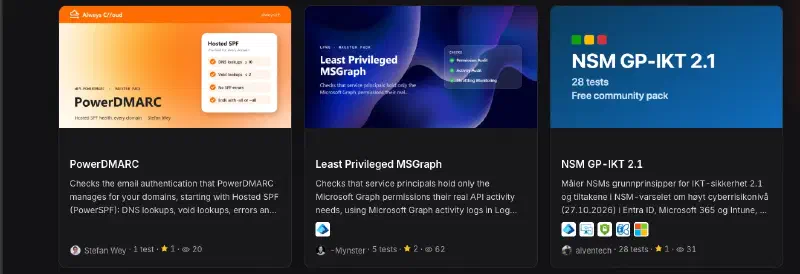
Now I have. NSM GP-IKT 2.1 is on Maester Packs as a free community pack, with the source on GitHub under the MIT licence. Version 0.3.0 was released and listed on 19 November 2026.
Note: This is a community pack. It isn’t made, reviewed or endorsed by NSM, the Maester project or Microsoft, and it comes with no support agreement or warranty. Issues and pull requests are welcome.
What you get #
- 28 tests that read Entra ID, Microsoft 365, Defender and Intune through Microsoft Graph: 14 for Entra ID, 10 for Intune, 2 for Defender, 1 for Exchange Online and 1 for Microsoft 365.
- NSM’s scale. Each result is høy, moderat or liten grad. Only høy grad passes.
- A link to NSM’s text in every test, with the clause the test answers and the scope it covers.
- Read-only. 12 Microsoft Graph read scopes, no writes to the tenant. The pack is rated Low risk on Maester Packs, and every scan passed.
- Maester 2.x support. Packs need Maester 3.0, which is still in preview, so each
release also ships the same tests as custom
tests for Maester 2 (
nsm-gp-ikt-maester2-<version>.zip).
The tests cover 21 of NSM’s 118 measures: 13 of the measures in NSM’s alert of 27 October 2026 that a system can show, plus 8 outside the alert. That includes 10 of the 15 priority-1 measures.
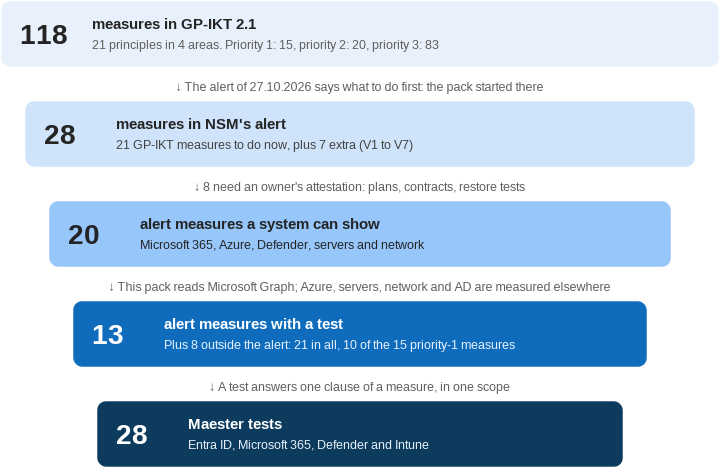
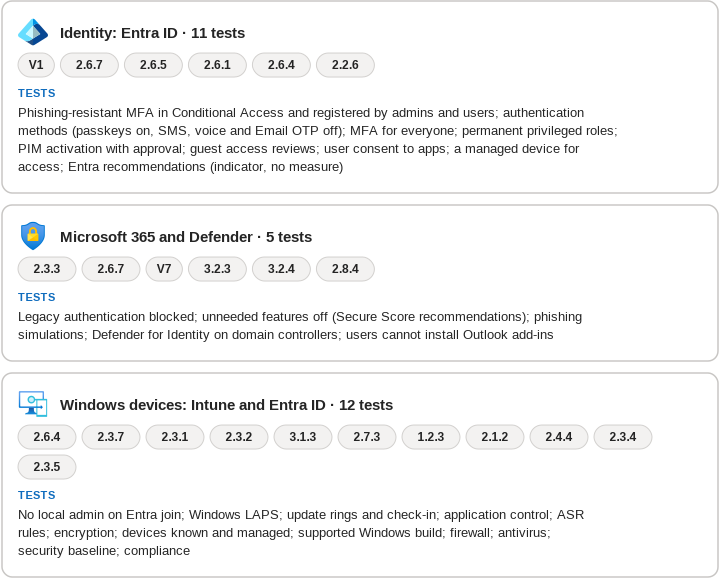
A measure with a test isn’t a measure that’s covered. A test answers one clause of a measure, within one scope. docs/coverage.md shows which clause and scope each test answers. The rest of NSM’s principles, such as network, OT and processes, still need an owner’s attestation, as I described in the first post.
Install and run #
You need PowerShell 7.4 or later, Maester 3.0 or later, and an account that can read the tenant, for example Global Reader.
Install-Module Maester -AllowPrerelease -Scope CurrentUser
Install-MtPack alventech/maester-pack-nsm-gp-ikt/nsm-gp-ikt
Install-MtPack shows what the pack reads and its risk before you approve it, and pins the version in
maester-packs.lock.json.
Connect with Maester’s own scopes plus the three the pack adds, then run:
$scopes = (Get-MtGraphScope) + 'AttackSimulation.Read.All', 'RoleManagementPolicy.Read.Directory', 'SecurityEvents.Read.All'
Connect-MgGraph -Scopes $scopes

Invoke-Maester -Pack NSM -SkipGraphConnect               # with Maester's own tests
Invoke-Maester -Pack NSM -SkipBuiltIn -SkipGraphConnect  # the NSM pack on its own
Sign in interactively in the browser. Don’t use -UseDeviceCode: device code sign-in is a known phishing route,
and many organisations block it with Conditional Access.
Tests that need a licence the tenant doesn’t have, such as Entra ID P2, Intune, Defender for Identity or Defender for Office 365 Plan 2, are skipped with a reason instead of failing.
Running it on a schedule #
For scheduled runs, grant the 12 scopes in the manifest (Uses.GraphScopes in maester-pack.json) as application
permissions to a managed identity or an app registration. Use a managed identity, workload identity federation or a
certificate rather than a client secret.
docs/permissions.md lists what
each scope is for.
Settings #
A few optional settings go under GlobalSettings in maester-config.json:
| Setting | Default | What it does |
|---|---|---|
EmergencyAccessAccounts |
none | Emergency access accounts left out of the identity tests |
NsmGpIkt.BaselinePolicyPattern |
(?i)\bCIS\b|baseline |
Which Intune policies count as a security baseline |
NsmGpIkt.MinimumWindowsBuild |
26100 |
The oldest Windows build that counts as supported |
NsmGpIkt.AllowedWindowsBuilds |
none | Extra supported builds, for example LTSC: [17763, 19044] |
maester-config.example.json has an example.
What changed from the proof of concept #
The proof of concept had 21 tests. Before releasing it I went through every test against NSM’s text, clause by clause. Most of the changes came from that review.
Every link to NSM now has a clause, a strength and a scope. A test links to a measure as direkte, delvis or
indikator, and every result ends with a line Gjelder: <scope>., so a høy grad can’t be read as covering the
whole measure. Some links moved as a result. For example, GP-IKT 2.6.7 accepts one-time passwords, so the tests for
phishing-resistant MFA now cite NSM’s alert only, and a tenant with MFA for everyone no longer fails 2.6.7.
docs/mapping.md has the rules.
Two broad tests became seven narrow ones. One test gave høy grad for a single measure when five kinds of Intune policy were assigned. Each kind has its own NSM measure, so it’s now four tests: attack surface reduction, firewall, antivirus and security baseline. Each gives høy grad only when the policy reaches all devices or users. In the same way, disk encryption and device compliance are now two tests, each against its own measure.
Three new tests: users don’t become local administrator when they join a device to Entra ID, Conditional Access requires a managed device, and users can’t install Outlook add-ins themselves.
Microsoft’s names stay in English. The report is in Norwegian, but feature names are as admins see them in the portals: legacy authentication, security defaults, report-only, eligible, compliant device. The Norwegian translations were words nobody would search for in the portal, and one was simply wrong.
Stricter where Maester is stricter. The test for SMS and voice now also requires Email OTP for password reset to be off, in line with Maester’s CISA check. Tests that read the same setting as a Maester test name the same MITRE ATT&CK techniques.
Its own place in the report. The pack has its own menu in Maester’s report, and a guide with prerequisites, connect, run and settings.
Before the release, the pack ran in my lab tenant both delegated and app-only with a certificate, with the same results on Maester 3.0 and on Maester 2.3.0. That doesn’t make it tested in every tenant, so tell me where it scores something wrong.
What’s next #
- On-premises Active Directory, as a second pack. Maester 3 already has its own AD tests. The plan is to map NSM’s on-premises measures to what those tests read, and write new tests only where NSM’s scale needs it. An organisation without on-premises AD never has to install it.
- The Azure side. The Azure Policy initiative from the first post, which groups Microsoft’s built-in policies by NSM measure, will be published as its own free community repository.
- More of the 118 measures, with the same method: map the measure, find the API that can answer it, and release a new version of the pack.
If you run the pack, I’d like to hear how it went, on GitHub or on Maester Packs.